


KacaTeknologi.com/en – ReDoS (Regular Expression Denial of Service) is an often-overlooked Denial of Service (DoS) vulnerability that can arise when applications process user-controlled regular expressions without properly limiting their complexity. A poorly designed regex can trigger excessive backtracking, causing CPU consumption to spike and the application to become extremely slow, or even hang for an extended period of time.
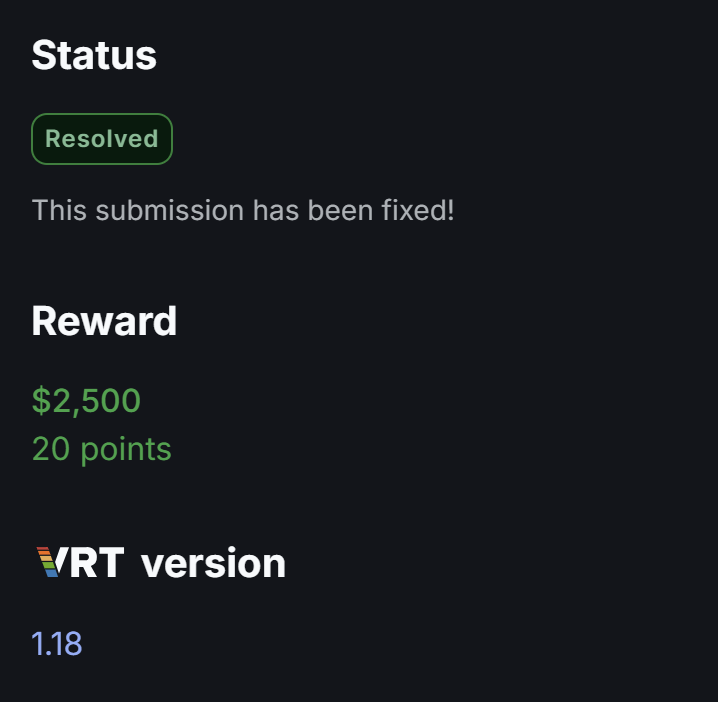
In this article, we’ll explore how a seemingly simple regex input can have a significant impact on an application’s availability, turning a small input into a $2,500 vulnerability.
If you’re not sure what regex is in general, I highly recommend reading this article so you get a better understanding before reading this post.
What is Regular Expression Denial of Service (ReDoS)?
Regular Expression Denial of Service (ReDoS) is a vulnerability that can make an application extremely slow by giving it a regular expression that requires an excessive amount of processing.
To understand ReDoS, think of a regular expression as a set of rules used to check whether text follows a particular pattern. Applications use regular expressions for things like validating email addresses, checking usernames, searching text, or validating input.
Most of the time, this process is extremely fast.
The problem starts when a regular expression is written in a way that gives the engine too many possible ways to interpret the same input.
The Evil Regex
One simple example is:
^(a+)+$Don’t worry if this looks confusing. The important part is what happens when the application tries to process certain inputs.
For example, this input is easy:
aaaaaaaaaaThe pattern can quickly determine that the input matches.
Now consider an input that looks almost correct:
aaaaaaaaaabThe final b makes the input invalid.
Instead of immediately giving up, some regex engines using a backtracking approach start going back and trying different ways to divide the a characters. It’s similar to trying to find your way through a maze.
Imagine entering a maze where every few steps you have two different paths to choose from. If you reach a dead end, you go back and try another route. If there are only a few choices, this is manageable.
But what if the maze keeps splitting into more and more paths? The number of routes you need to check can grow incredibly quickly. That’s essentially what can happen with an inefficient regular expression.
Uncontrolled Regex in Regex Input
In a redacted bug bounty program, I discovered an application with a Regex Export feature. The feature allows users to provide a regular expression, which the application then uses to find and export specific information from raw event data.
This immediately caught my attention from a security perspective because the regex itself was controlled by the user. If the application accepted a regex with excessive backtracking potential without performing any validation or imposing complexity limits, it could potentially be abused to cause a ReDoS condition.
Crafting the Evil Regex
I started with a well-known ReDoS pattern based on nested quantifiers, such as:
(a+)+This pattern is interesting because it gives the regex engine many different ways to divide a sequence of a characters. If the input eventually fails to match, the engine may go back and try those different possibilities one by one.
Since the application uses regex capture groups, I adapted the pattern to fit its expected format:
(?<g1>(?:a+)+)(?<g2>z)Here, g1 captures the sequence of a characters, while g2 expects a z at the end.
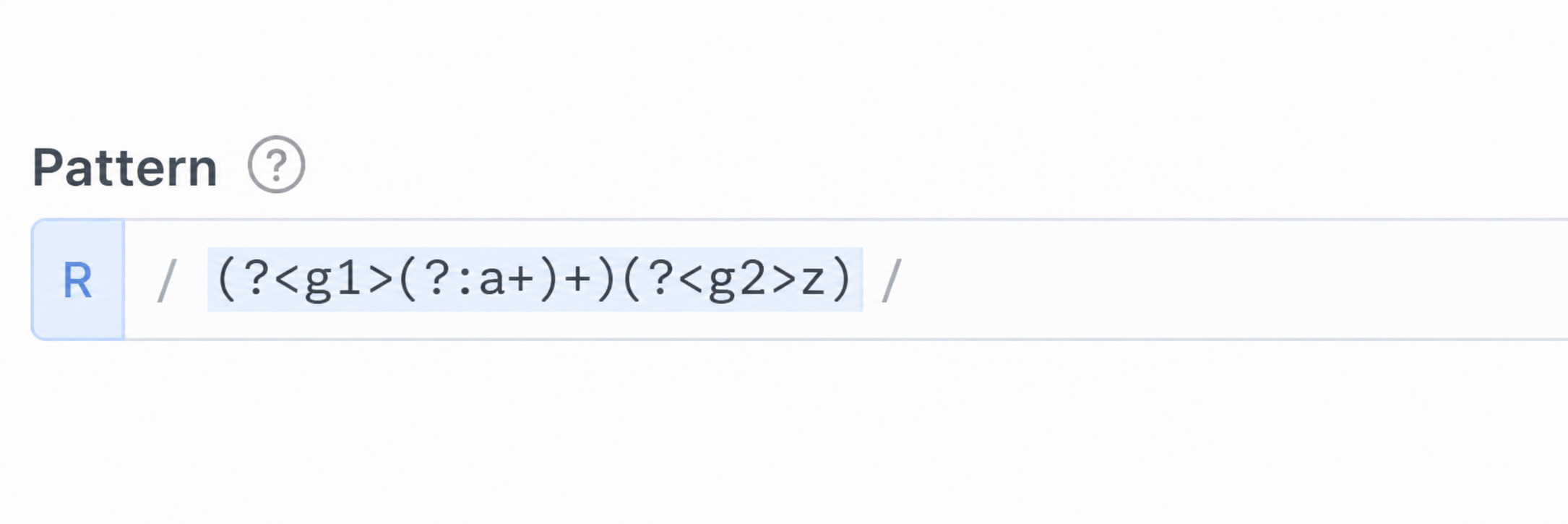
The important part is (a+)+, which is responsible for the potentially expensive backtracking. I then used an input such as:
aaaaaaaaaaaaaaaaaaaaaaaaaaaaaabThe input contains a long sequence of a characters followed by b instead of the expected z. This forces the regex engine to reconsider the different ways it could have matched the a characters before eventually determining that the input doesn’t match.
This is exactly the behavior I was looking for when testing for ReDoS.
Validating the ReDoS Vulnerability
Validating the ReDoS issue is relatively straightforward. If we have the application running locally, for example in Docker, we can monitor its CPU usage and observe whether the application becomes unresponsive after configuring the evil regex and sending the malicious payload.
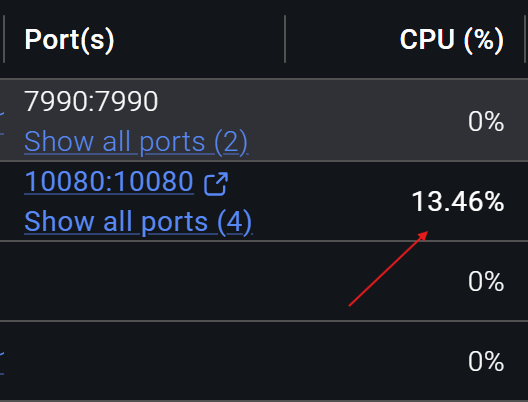
In this case, I installed the application locally using Docker so I could establish a baseline before reproducing the ReDoS issue. Before the test, the application was using only 13.46% CPU, which was within the normal range.
Then, I sent two types of requests to the application:
- Blocking requests: Each request contained the specially crafted input
aaaaaaaaaaaaaaaaaaaaaaaaaaaaaab, designed to trigger the expensive regex processing. - Normal request: A regular event such as
normal event, which represents a legitimate user request.
I then sent 100 blocking requests concurrently:
FLOOD_COUNT=100The requests were sent in the background, allowing multiple requests to reach the application at roughly the same time.
After a short delay, I sent a normal request and measured how long it took to receive a response. Here’s the full code:
 #!/bin/bash

  HOST="http://localhost:8088/endpoint/blabla/event"
  AUTH="Authorization: Bearer redos123"
  CT="Content-Type: application/json"
  BLOCK='{"event": "aaaaaaaaaaaaaaaaaaaaaaaaaaaaaab"}'
  NORMAL='{"event": "normal event"}'

  # Send 100 blocking requests — excess ones queue up and re-block
  FLOOD_COUNT=100

  echo "[*] Flooding with $FLOOD_COUNT requests (worker count unknown)..."
  for i in $(seq 1 $FLOOD_COUNT); do
    curl -s -X POST "$HOST" -H "$AUTH" -H "$CT" -d "$BLOCK" &
  done

  sleep 0.5

  echo "[*] Sending normal event..."
  time curl -s -X POST "$HOST" \
    -H "$AUTH" -H "$CT" \
    -d "$NORMAL"
  echo "[*] Done."
Under normal conditions, the normal event request should be processed almost immediately. However, while the application was busy processing the ReDoS payloads, the normal request experienced significant delay.
This demonstrated that the issue was not merely a regex taking longer than expected, it could consume application resources and affect the availability of legitimate requests, turning the regex weakness into a practical Denial of Service condition.
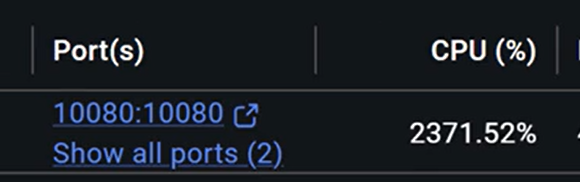
Now, if we check the CPU usage, we can see that it has skyrocketed to 2,300%, a massive increase from the 13.46% baseline we observed earlier.
Resending a Normal Event after Reproducing the ReDoS
Before sending the blocking event, the application processes the normal event normally and returns an HTTP 200 OK response:
< HTTP/1.1 200 OK
< Content-Type: application/json
< Date: Thu, 26 Mar 2026 13:33:37 GMT
< Connection: keep-alive
< Keep-Alive: timeout=5
< Transfer-Encoding: chunked
<
* Connection #0 to host localhost left intact
{"text":"Success","code":0}
The important part here is the {"text":"Success","code":0} response at the end. It indicates that the application successfully processed the request and returned a normal response.
However, after configuring the evil regex and sending the blocking event containing aaaaaaaaaaaaaaaaaaaaaaaaaaaaaab, the behavior changes. When I sent the same normal event, the application no longer returns the expected success response:
>
* upload completely sent off: 35 bytes
Instead, the connection remains open without receiving a response from the application. In other words, the request was successfully sent, but the application was too busy processing the ReDoS payload to respond normally.
Navigating the App Through the UI
Next, I attempted to navigate through the application using the UI. However, the application was no longer accessible. Every page returned an “Unexpected error occurred” message, preventing me from accessing any of its functionality.
This demonstrated that the ReDoS condition was affecting the application’s overall availability, rather than just slowing down a single request.

I reported the vulnerability through Bugcrowd and categorized it under the VRT as Application-Level Denial-of-Service (DoS) > Critical Impact and/or Easy Difficulty (P2), based on its impact on the application’s availability.
Also read: $5,000 Bounty From Microsoft Teams Community Invitation Bypass (CVE-2025-49731)
Bottom Line
ReDoS happens when a user-controlled regex causes the application to spend excessive time processing specially crafted input, eventually slowing down or blocking normal requests.
The simple flow would be:
Input an evil regex → Send a malicious payload → The regex engine gets stuck backtracking → CPU/resources are consumed → The application becomes slow or unresponsive.
Hope you find this article insightful!